A to-do list that works with an ADHD brain.

Less clutter. Less overwhelm. Almost no setup. Smart Tasks is the simple, colorful planner that meets you where you are.

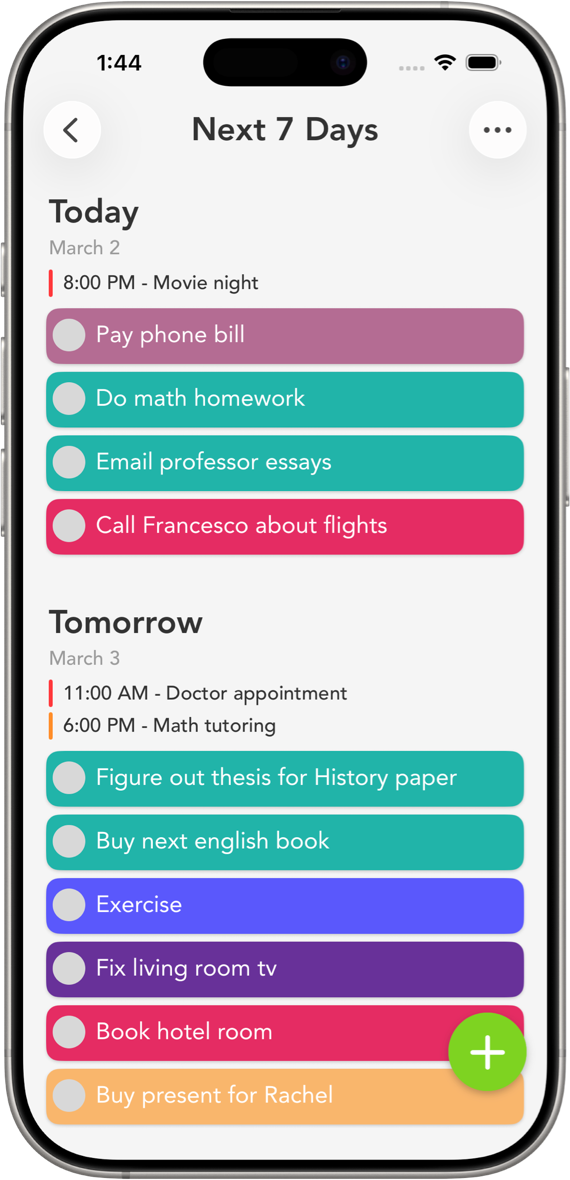
Smart Tasks is a simple, color-coded to-do list and weekly planner made to cut down on ADHD overwhelm. It opens fast, adds a task in one tap, and needs no account. Every category gets its own color, so the right list stands out before you read a word. The Next 7 Days screen splits your week into one day at a time, so today stays short instead of endless. It's free, rated 4.7 stars from 4,400+ ratings, and built for iPhone, iPad, Mac, and Apple Watch.

Download Free

Why it works

Why Smart Tasks works for ADHD

The hard part of a to-do list usually isn't the tasks. It's everything around them. Apps that want an account, a tour, and a project hierarchy turn into one more thing to manage, so they get abandoned by the second week. And a single long list, where everything looks equally urgent, is its own kind of stuck.

Smart Tasks is built to skip those traps. You add a task the moment it crosses your mind, in one tap, with no sign-up in the way. You give each category a color, so your eyes find groceries or work without reading every line. And your week is already split into days, so today stays short and finishable instead of becoming a wall of everything you've ever written down.

None of this is a cure. No app fixes executive function. What a good one can do is make starting a little easier, and that's the whole idea here.

Six things ADHD users tell us they love

It's visual

41 built-in colors, plus custom ones. Color does the sorting, so you scan and prioritize with your eyes instead of reading every row.

Almost no setup

No account, no onboarding, no learning curve. Open it and start adding tasks. The less it asks of you, the more the habit sticks.

A week in pieces

Next 7 Days lays your week out one day at a time, so today feels doable instead of like one giant list.

Routines that repeat

Set a task to come back daily, weekly, monthly, or a few days after you finish it. The app remembers so you don't have to.

Reminders that nudge

Add as many reminders to a task as you want, so the right nudge shows up at the right time and nothing gets lost.

Quiet, not noisy

A clean, plain screen means less to process. A widget keeps today's list on your home screen so it stays in front of you.

A five-minute setup

How to set up Smart Tasks for ADHD

You don't need a system to start. But a few small choices make the app a lot stickier. Here's the setup most people land on.

1. Make four to six colored categories, and stop there

Keep it loose. Something like Work, Home, Errands, Health, and one called Just for me. Pick colors that look obviously different from each other. Skip the urge to build twenty categories. The point is recognizing a list in a glance, not filing it.

2. Live in Next 7 Days

Make the weekly screen your home base. Put each task on the day you actually plan to do it. If a day looks too full, that's useful. Drag a couple of tasks forward. A realistic day beats staring at an endless backlog.

3. Capture first, tidy later

When a thought shows up, add it in one tap and move on. You can recolor or reschedule whenever. The habit worth protecting is capture, so don't let tidying get in its way.

4. Put a widget on your home screen

Add a Smart Tasks widget so today's list is the first thing you see. Out of sight tends to mean out of mind, and keeping the list visible does half the work.

5. Turn your repeating stuff into routines

Refilling a prescription, the Sunday reset, a weekly check-in. Set these as routines so they come back on their own and you never have to remember to add them again.

Want a deeper weekly system? Read our guide to planning your week. Or see how students use the same setup for classes and deadlines.

ADHD and Smart Tasks, answered

Yes. A lot of people with ADHD use Smart Tasks because it stays out of the way. There's no account and almost no setup, every category has its own color so the right list stands out, and the Next 7 Days screen splits your week into one day at a time so today is short instead of endless. It's free to download and rated 4.7 stars from over 4,400 App Store ratings.

Color lets your eyes do the sorting before you read anything. A wall of identical text is tiring to scan, but one glance at color separates work from home from school. In Smart Tasks every category gets one of 41 built-in colors, or a custom color you pick, so the list you need stands out on its own.

Low friction. Most task apps get dropped because they ask for too much up front. Smart Tasks opens fast, adds a task in one tap, needs no account, and then gets out of the way. The smaller the gap between a thought and a saved task, the better the chance the habit lasts.

Yes. Smart Tasks is free to download and use with core features. An optional Smart Tasks+ subscription adds iCloud sync, reminders, routines, and notes. One subscription covers all your Apple devices on the same Apple ID.

Quieter mind. Clearer day.

Download Smart Tasks free and let color and structure carry some of the load.

Download on the App Store
Make it yours

Pick a color. Paint the page.

The same hand-picked colors you'll find inside the app. Tap one to recolor everything.

Tap any color to recolor the page