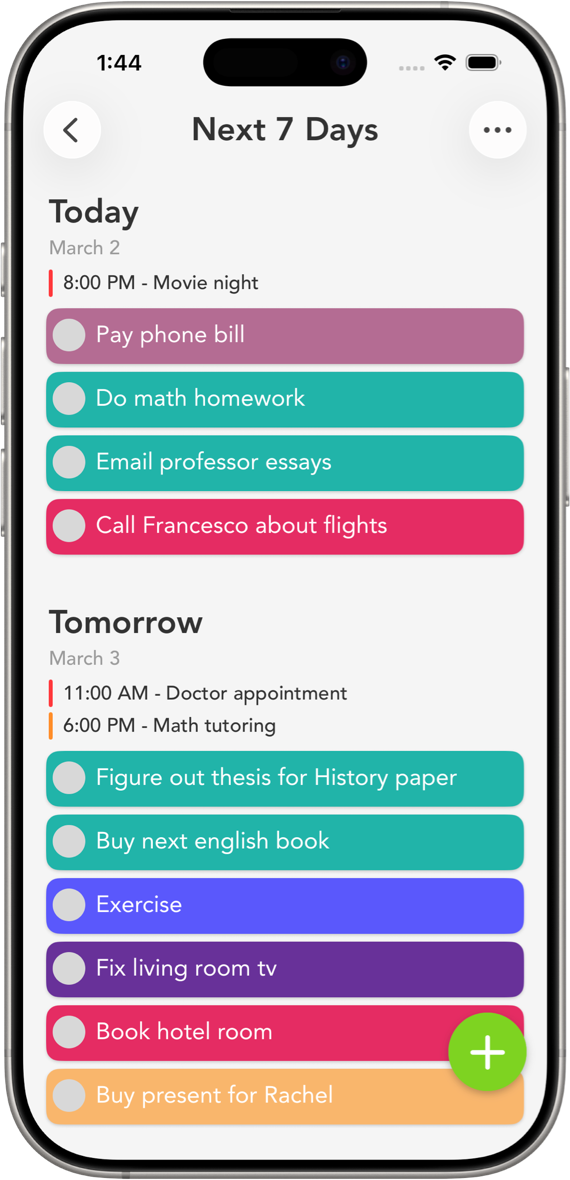
Smart Tasks keeps what's good about Reminders, simple and private and built for Apple, then adds the color, the weekly view, and the polish it's missing.
Smart Tasks is a simple, colorful alternative to Apple Reminders for iPhone, iPad, Mac, and Apple Watch. It adds 41 category colors, a weekly Next 7 Days screen, three home-screen widget types, recurring routines, and a smoother drag-and-drop feel, while staying account-free and private. There's a built-in import that brings your reminders across. Free to download, rated 4.7 stars from 4,400+ ratings.
Apple Reminders is genuinely good. It's free, built into every device, syncs through iCloud, handles time and location alerts, and works with Siri. If you keep a couple of short lists and that's enough, there's no reason to switch, and we'll happily say so.
When it's worth switching to Smart Tasks
People tend to outgrow Reminders for a handful of reasons. If any of these sound like you, this is the app built for it.
Your lists all look the same. Reminders is mostly plain text, while Smart Tasks gives every category its own color, so a glance tells you what's work, what's home, and what's just for you. You think in weeks, not just lists, and the Next 7 Days screen spreads your tasks across the days so you can plan ahead. You want tasks on your home screen, and there are three widget types to put them there. You repeat the same tasks constantly, and routines bring them back daily, weekly, monthly, or a few days after you finish. Or you just want the whole thing to feel nicer, with smoother drag-and-drop, custom swipe actions, your own app color, and Apple's Liquid Glass look on iOS 26.
As iMore put it, Smart Tasks is "Reminders turned up to 11." 9to5Mac called it a way to "organize your entire week in an extremely easy way."
No trade-offs
What you keep when you switch
Changing apps usually means giving something up. Here you don't. It's still private, with no account and no sign-up, and your tasks live on your device and in your personal iCloud, never on third-party servers and never sold to advertisers. It's still native Apple, built for iPhone, iPad, Mac, and Apple Watch, with iCloud sync across all of them. And it still talks to Reminders, since the tasks you import keep syncing changes back to the Apple Reminders app. It's free to start, with Smart Tasks+ as an optional upgrade.
How to switch in under a minute
Download Smart Tasks from the App Store.
Open Options and use Importing Reminders to bring your Apple Reminders in. Each one becomes a task.
Give each list a color, and drop your tasks onto days in Next 7 Days.
Add a widget to your home screen, and you're set.
Common questions
Reminders and Smart Tasks, answered
Smart Tasks is a popular alternative for people who want a more visual, color-coded experience. It adds 41 category colors plus custom colors, a weekly Next 7 Days screen, three home-screen widget types, recurring routines, and a smoother drag-and-drop feel, while staying simple and account-free. It's free, rated 4.7 stars from over 4,400 ratings, and native on iPhone, iPad, Mac, and Apple Watch.
Apple Reminders is built in and capable, but plain. Smart Tasks is more visual and more about planning. Every category gets its own color, the Next 7 Days screen lays your week out day by day, three widget types put tasks on your home screen, and routines bring back recurring tasks on their own. Both keep your data in your personal iCloud, and Smart Tasks needs no separate account.
Yes. Smart Tasks has a built-in import in Options that brings your Apple Reminders into the app, turning each reminder into a task. After importing, changes you make to those imported tasks, like editing or completing them, sync back to the Apple Reminders app.
Yes. Smart Tasks is free to download and use with core features. An optional Smart Tasks+ subscription adds iCloud sync, reminders, routines, and notes across all your Apple devices on the same Apple ID.